Comic Art
AI Manga & Comic Art Prompts: Generating Multi-Panel Pages and Action Sequences
Learn how to prompt authentic Japanese manga pages, comic strip panels, screentone dot textures, dynamic action speed lines, and dialogue-safe gutters with AI.
In this guide
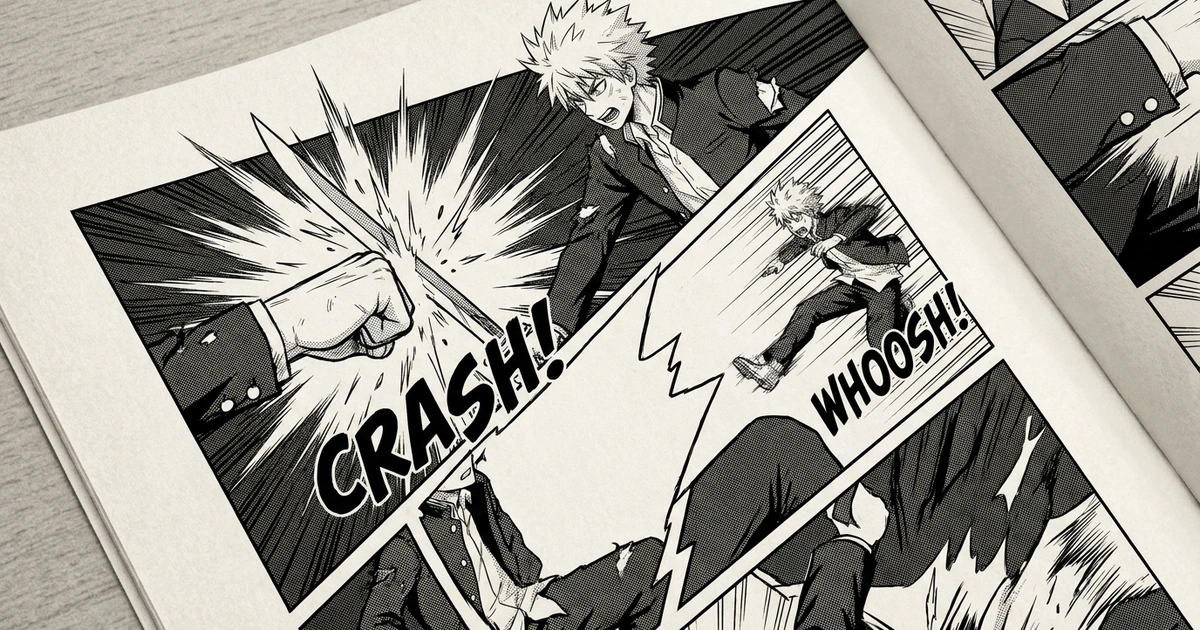
Manga and sequential comics have a distinct visual vocabulary: dramatic Dutch-angle perspectives, dynamic ink hatching, delicate halftone screentone dots, sound-effect onomatopoeia, and intentional reading gutters between panels.
In Google Search Console, FreeGPTBanana ranks on the first page for specialized comic queries: japanese shonen manga page layout (pos 5.5), journey to the west chinese comic art (pos 7.3), and cinematic warrior katana movie poster (pos 3.7).
However, if you simply ask an AI model for a “manga page,” it often generates a messy cluster of overlapping drawings, incoherent scribbles inside fake speech bubbles, or flat grayscale washes instead of crisp dip-pen line art.
In this guide, we break down production-grade prompt templates to generate three distinct sequential art formats: High-Octane Shonen Action Pages, Atmospheric Seinen Drama Layouts, and Traditional Chinese Lihua Graphic Novels. For character model sheets and emotion grids, see our character design prompts guide.
The 4 Golden Rules of AI Manga Prompting
To ensure your AI generated comic page looks like an authentic published tankobon rather than generic grayscale fanart, embed these four structural directives into your prompt:
- Panel Grid Hierarchy: Explicitly specify the panel breakdown. Describe the layout mathematically (e.g.,
divided into four distinct diagonal panels separated by clean white gutters). - Ink and Texture Mediums: Real manga is drawn with G-pens, Maru-pens, and screentone sheets. Use authentic technical phrases:
deep black India ink line art, cross-hatching shadow gradients, 60-line halftone screentone dot textures. - Speed Lines & Kinetic Energy: Manga conveys velocity through motion lines. Instruct:
radiating explosive speed lines, motion blur streaks along sword trajectories. - Dialogue-Safe Margins: AI models struggle with rendering long blocks of legible text. Instruct the model to render
empty white dialogue balloons or blank panel corners reserved for typography.
1. High-Octane Shonen Manga Action Pages
Shonen action relies on extreme camera angles, high contrast, and dynamic impact moments.
The Decisive Katana Duel
Authentic Japanese shonen manga page layout rendered in high-contrast black and white ink line art. Divided into four dynamic panels with clean white gutters:
- Top Wide Panel: An establishing silhouette shot of two samurai facing each other on a misty bamboo bridge at dusk, wind whipping fallen leaves across the path.
- Middle Left Panel: Extreme close-up of the protagonist’s eyes, pupils dilated with fierce battle focus, heavy ink cross-hatching in the shadows.
- Middle Right Panel: Rapid speed lines radiating outwards from a flash of steel as the katana is drawn from its scabbard in a split-second blur.
- Bottom Hero Panel: A massive explosive clash of blades, shockwaves splitting bamboo stalks in the background, stylized Japanese katakana onomatopoeia carved into the negative space. Authentic 1990s Weekly Shonen Jump ink aesthetic, crisp screentone dot shading, generous empty areas for dialogue balloons.
The Mecha Launch Sequence
Multi-panel sci-fi manga page detailing the emergency launch of a giant humanoid robot.
- Panel 1: Overhead view of the flooded hangar chamber draining rapidly, red alarm flashing (represented by heavy screentone dot patterns).
- Panel 2: Pilot in cockpit tightening flight harness, HUD displays reflecting in pilot visor.
- Panel 3: Rocket thrusters igniting with brilliant white light cutting through dense exhaust smoke.
- Panel 4: Wide vertical panel showing the mecha launching up the launch tube into the night sky. Crisp technical mechanical linework, authentic screentone textures, clean white page margins.
2. Atmospheric Seinen & Noir Comic Layouts
Seinen layouts prioritize psychological tension, rich atmospheric shadows, and deliberate pacing.
Rainy Tokyo Alleyway Detective Confrontation
Mature psychological seinen manga page with deep noir black ink shadows and delicate screentones.
- Panel 1: Horizontal wide shot of a rainy Tokyo backstreet at 2:00 AM, glowing neon signs casting intricate reflections on wet asphalt.
- Panel 2: A tired detective in a wet trench coat lighting a cigarette, the lighter flame casting dramatic under-lighting on his weathered jawline.
- Panel 3: Close-up of a mysterious gloved hand dropping a microcassette tape into a storm drain puddle.
- Panel 4: The detective glancing sharply over his shoulder into the darkness. Deep cinematic contrast, authentic G-pen ink linework, subtle rain streaks across panels, mature graphic novel aesthetic.
Quiet Slice-of-Life Cafe Afternoon
Gentle slice-of-life manga page capturing a peaceful study session. Soft 4-panel vertical 4-koma layout. Clean rounded ink contours, soft light screentones, steaming tea cups, dappled afternoon sunlight filtering through cafe plants, quiet expressive body language, cozy indie manga aesthetic.
3. Traditional Chinese Comic (Lianhuanhua) Art
Chinese traditional sequential art features panoramic horizontal framing and fine brushwork.
Journey to the West: Monkey King Cloud Battle
Traditional Chinese graphic novel (Lianhuanhua) illustration page depicting the Monkey King (Sun Wukong) battling heavenly warriors above swirling celestial clouds. Exquisite fine-line Gongbi brushwork, fluid ribbon-like cloud swirls, gold and vermilion mineral ink accents against aged rice paper. Ornate traditional cloud borders framing the composition, dynamic martial arts stance, majestic classical Chinese epic art style.
Modular Manga Prompt Blueprint
Use this prompt formula to construct custom comic pages:
[Genre & Medium]: "Authentic [Shonen / Seinen / Shoujo] manga page layout in black and white India ink..."
[Panel Architecture]: "...divided into [Number] panels separated by clean white gutters..."
[Panel Content Breakdown]: "...Panel 1 features [Scene A], Panel 2 features [Scene B], Panel 3 features [Scene C]..."
[Texture & Finishing]: "...finished with 60-line screentone dot patterns, dynamic speed lines, and empty white speech bubbles."
Adding Dialogue After Generation
Once you generate your manga page in the Imagine workspace:
- Export the image at high resolution.
- Open it in a comic lettering tool like Clip Studio Paint, Photoshop, or Canva.
- Use a classic comic font (such as CC Wild Words, Anime Ace, or Blambot) to typeset your dialogue inside the empty white speech balloons.
FAQ
Can AI generate authentic screentone dot textures?
Yes. Prompting specifically for 60-line halftone screentone dot textures, manga gray tones, and cross-hatching instructs the model to emulate physical screentone films rather than smooth digital airbrush gradients.
How do I ensure panel reading order is clear?
In your prompt, label panels clearly (Top Panel, Middle Left Panel, Bottom Right Panel). For Japanese manga, specify traditional right-to-left reading flow with clear directional composition.
Which model handles complex multi-panel manga best?
Nano Banana Pro is specifically recommended for multi-panel manga because its larger spatial reasoning capacity allows it to manage up to four distinct panel scenes simultaneously without blending character details between frames.
Put the workflow into practice
Create a focused first image
Start with included credits, keep the prompt and references together, and refine the result in your private Imagine workspace.
Open Imagine