Creative Showcase
Free AI Wallpaper Generator: Create Stunning 4K Desktop and Phone Wallpapers in Any Ratio
Generate custom 4K wallpapers for Mac, Windows, iPhone, and Android for free. Learn prompt formulas for minimalist, cyberpunk, anime, and landscape backgrounds.
In this guide
Most wallpaper websites force you to settle for recycled stock photography or generic digital art that doesn’t quite fit your monitor’s aspect ratio or lock screen layout.
With modern multimodal visual models, you no longer need to crop or stretch awkward dimensions. Using a dedicated ai wallpaper generator free, you can synthesize custom, ultra-sharp 4K wallpapers engineered specifically for your screen setup—whether that is a 21:9 curved ultrawide gaming monitor, a dual 16:9 workstation, or a vibrant 9:16 mobile OLED display.
In this guide, we break down optimal aspect ratios, prompt design techniques for clean icon breathing space, and ready-to-use prompt recipes on FreeGPTBanana.
What Makes an Effective AI Wallpaper?
An effective AI wallpaper balances high visual fidelity with functional UI clearance. It delivers crisp 4K texture across large retina panels while reserving low-contrast negative space for desktop icons, application docks, or lock screen system widgets.
A great desktop or lock screen wallpaper has different functional requirements than a standalone art piece:
- Compositional Negative Space: A wallpaper must leave clean, uncluttered zones for desktop icons, application docks, or lock screen clocks and widgets. Busy textures directly behind text make icon labels unreadable.
- True Aspect Ratio Match: Generating in square (1:1) and stretching causes severe blurring and edge distortion. Always generate directly in 16:9 (desktop), 21:9 (ultrawide), or 9:16 (smartphone).
- High Dynamic Range (HDR) & 4K Output: Wallpapers are magnified across 27-inch to 34-inch displays; pixel density and crisp edge definition are paramount.
- Restrained Color Palettes: Overly busy, saturated visuals cause eye strain over long working sessions. Favor atmospheric gradients, deep shadows, and subtle textural contrast.
Aspect Ratio Cheatsheet
| Display Type | Aspect Ratio | Target Dimensions | Recommended Composition |
|---|---|---|---|
| Standard Desktop / Laptop | 16:9 |
3840 × 2160 (4K) | Subject weighted to right third; left side left open for desktop icons |
| Curved & Ultrawide | 21:9 |
3440 × 1440 | Panoramic horizon line, wide environmental vista, centered atmospheric depth |
| iPhone & Android Lock Screen | 9:16 |
2160 × 3840 | Top third clean for clock/widget; focal subject resting in lower-middle section |
| Tablet / iPad Pro | 4:3 / 3:2 |
2732 × 2048 | Balanced square-adjacent framing, adaptable to both horizontal and vertical rotations |
4 Tested Wallpaper Prompt Formulas
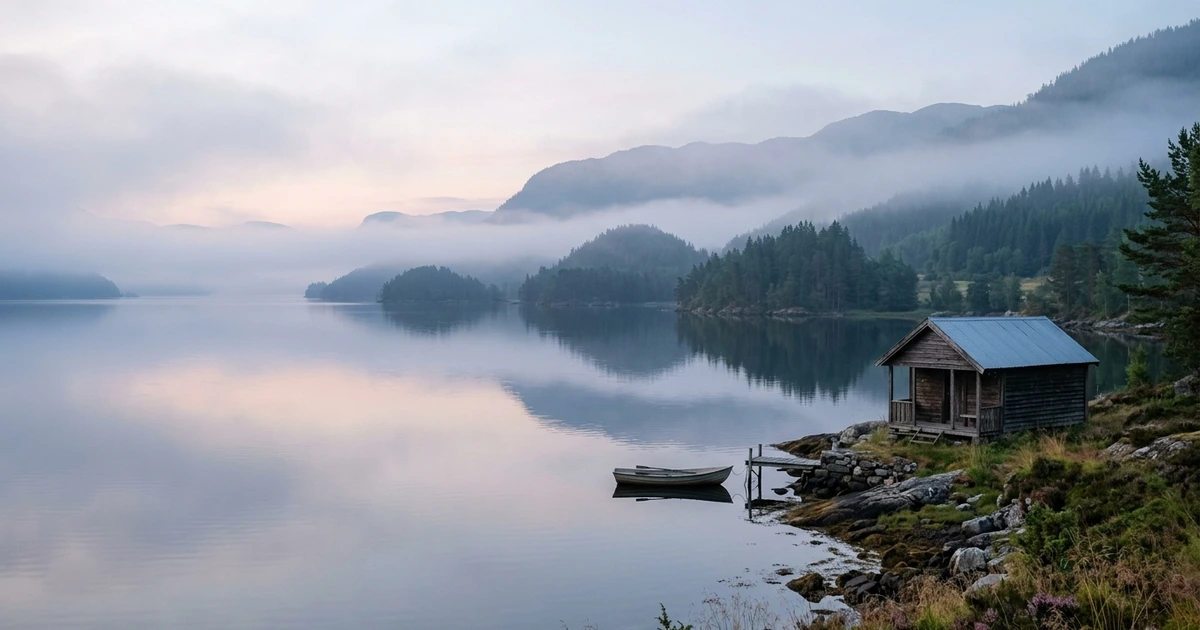
1. Minimalist Scandinavian Landscape (16:9 Desktop)
Minimalist architectural landscape of a lone wooden cabin on the calm shores of a Norwegian fjord, misty morning fog rolling off dark pine trees, muted slate blue and charcoal gray color palette, expansive negative space on the left side for desktop icons, cinematic 16:9 framing, clean 4K fine-art photography, peaceful and serene atmosphere.
2. Retro-Futuristic Cyberpunk Skyline (21:9 Ultrawide)
Panoramic ultrawide 21:9 cyberpunk metropolis seen from a high penthouse terrace, towering neon skyscrapers emerging through thick low-hanging rainclouds, deep magenta, cyan, and obsidian black tones, reflective wet surfaces, atmospheric volumetric fog, crisp architectural details, no text or visual clutter in the lower dock area.
3. Studio Ghibli Inspired Pastoral Road (9:16 Phone Wallpaper)
Vertical 9:16 anime landscape inspired by classic hand-painted Studio Ghibli backgrounds, a sunlit countryside dirt path lined with blooming wildflowers leading toward distant summer cumulus clouds, top 30 percent reserved for clear sky and lock screen widgets, warm golden daylight, watercolor textures, vibrant nostalgic colors.
4. Dark Mode Organic Fluid Geometry (OLED Friendly)
Deep black OLED wallpaper featuring flowing ribbons of iridescent metallic liquid chrome and dark obsidian glass, soft cyan and violet rim illumination, smooth velvety dark background with 90 percent black pixels, macro lens perspective, ultra-sharp reflections, 4k digital abstract art.
Step-by-Step: How to Generate and Download on FreeGPTBanana
Creating a wallpaper tailored to your hardware takes less than 60 seconds:
- Open the Studio: Head to FreeGPTBanana Imagine.
- Select Canvas Dimensions: Choose your target aspect ratio: select 16:9 for computers, 21:9 for ultrawide setups, or 9:16 for smartphones.
- Choose the Model Engine: Switch model to Nano Banana Pro for maximum sharpness, architectural accuracy, and photorealistic depth.
- Input Prompt: Paste your prompt formula, ensuring you include explicit camera viewpoint and lighting notes.
- Generate & Export: Click Generate, review the 4K render in under 4 seconds, and download the full-resolution asset to set as your system background.
Frequently Asked Questions
What resolution do I need for a 4K desktop monitor?
A standard 4K UHD display requires a canvas of 3840×2160 pixels in a 16:9 ratio. FreeGPTBanana generates high-density base visuals that scale cleanly to 4K without introducing interpolation artifacts or edge halos.
How do I stop desktop icons from getting lost in wallpaper details?
In your prompt, explicitly request an asymmetric composition such as “subject placed in the right third, left two-thirds feature soft gradient mist and negative space.” This leaves a low-contrast backdrop where desktop icons remain easily readable.
Will dark mode OLED wallpapers actually save phone battery?
Yes. On OLED displays (such as modern iPhones and flagship Android devices), pure black pixels (#000000) completely turn off their individual light emitters. Using prompts with “90 percent black background” conserves significant battery life over bright imagery.
Can I generate matching dual-monitor wallpapers?
To create a seamless dual-monitor pair, generate an ultrawide image in a 21:9 or 32:9 aspect ratio, or run two consecutive generations using the same seed and lighting style with adjacent camera vantage points.
Summary
Custom AI wallpapers allow your digital environment to reflect your personal aesthetic. Explore FreeGPTBanana today with your complimentary credits and design your dream setup.
Put the workflow into practice
Create a focused first image
Start with included credits, keep the prompt and references together, and refine the result in your private Imagine workspace.
Open Imagine