Explore

Education AI image prompts

Browse 13 reusable Education prompt examples and send any direction into Imagine.

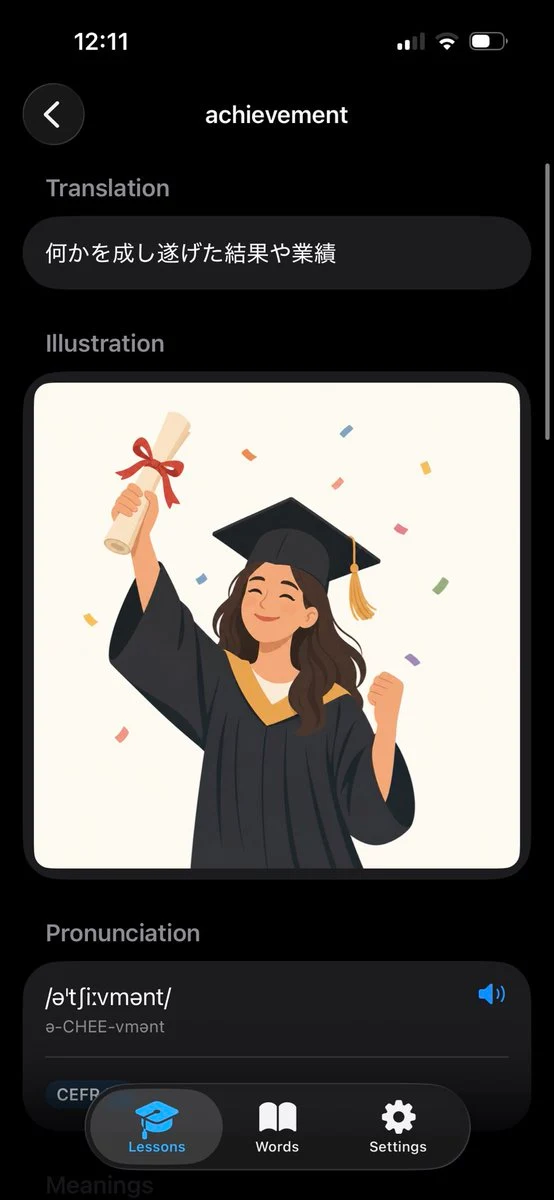
Dark Mode Dictionary App UI Mockup
technology education minimalist

Dark Mode Dictionary App UI Mockup

Goal: Create a realistic iPhone screenshot of a sleek dark-mode English dictionary/vocabulary learning app showing the entry for {argument name="word" default="achievement"}. Canvas: Vertical smartphone screen, 9:16 aspect ratio, black background, iOS-style status bar at the top showing 12:11 on the left and cellular/Wi‑Fi/battery icons on the right. Use rounded cards, soft shadows, and a modern minimal UI. Layout: Top navigation has exactly 2 elements: a circular dark back button with a white left chevron on the upper left, and the centered page title “achievement” in white. A thin vertical scroll indicator appears along the right edge. Sections: Show exactly 4 visible content sections in this order: 1) Translation, 2) Illustration, 3) Pronunciation, 4) a partially visible Meanings header at the bottom. Section labels are muted gray, bold, and left aligned. Text content: Under “Translation,” place one rounded dark pill card containing the Japanese text {argument name="translation text" default="何かを成し遂げた結果や業績"}. Under “Pronunciation,” create one large rounded dark card with the phonetic spelling {argument name="phonetic text" default="/əˈtʃiːvmənt/"}, the readable pronunciation “ə-CHEE-vmənt,” a blue speaker icon on the right, a thin divider line, and a small rounded “CEFR” tag near the lower left. Illustration: In the Illustration section, place one large rounded rectangle image card with an off-white background. Inside it, draw a cheerful young graduate woman in a black graduation gown and mortarboard with a gold tassel, smiling with eyes closed. She raises a rolled diploma tied with a red ribbon in her left hand and clenches her right fist in celebration. Add colorful rectangular confetti around her. Use a flat vector illustration style, warm colors, clean edges, and no text inside the illustration. Bottom navigation: Overlay a floating rounded black tab bar at the bottom with exactly 3 tabs: “Lessons” with a blue graduation-cap icon and highlighted gray pill background, “Words” with a white open-book icon, and “Settings” with a white gear icon. The tab bar partially covers the pronunciation card and the faint “Meanings” header. Visual style: High-fidelity mobile app mockup, dark theme, iOS proportions, rounded corners, subtle gradients, white and gray typography, blue accent color, polished product screenshot. Avoid extra words, extra icons, watermarks, or browser chrome.
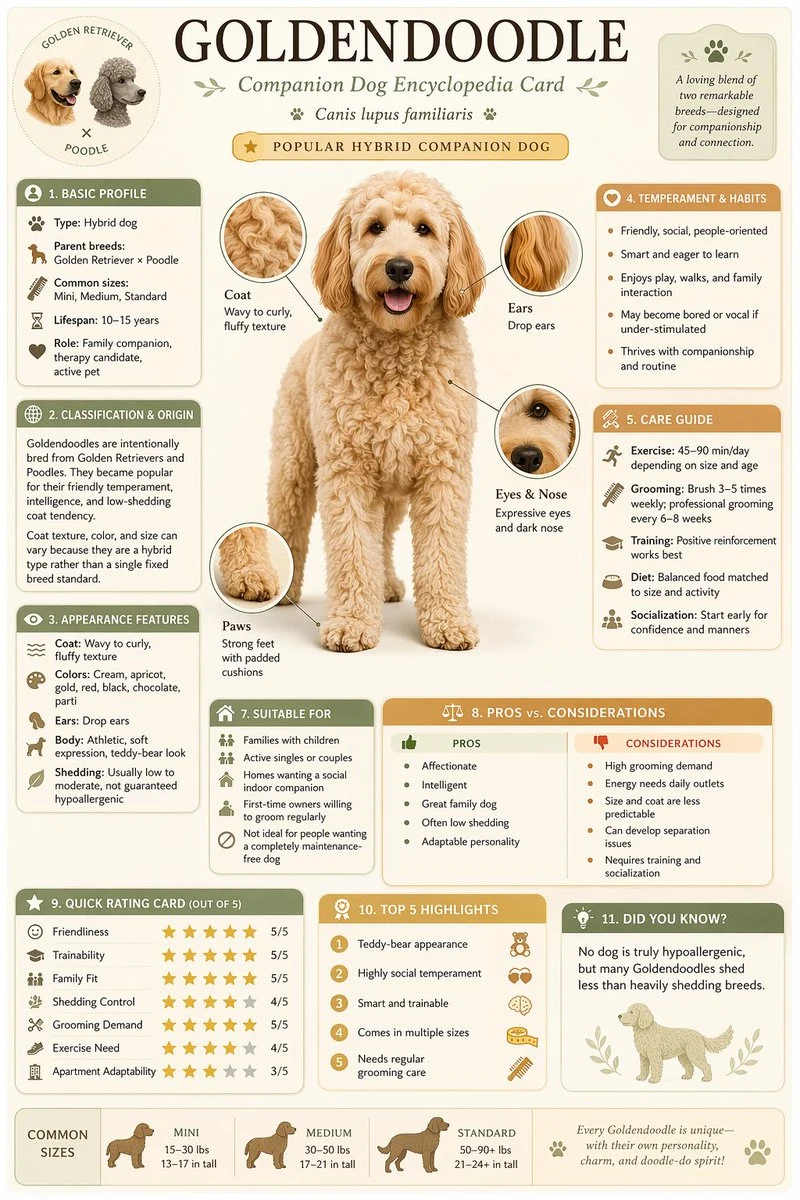
Science Encyclopedia Vertical Poster
diagram infographic education

Science Encyclopedia Vertical Poster

Generate a high-quality vertical science popularization encyclopedia image based on [Theme]. Include a clear beautiful main visual, several detail close-ups, multiple rounded modular information sections, clear title hierarchy with emphasis labels, concise but rich encyclopedia content, and visual scoring or Top 5 summary modules. Light clean background, soft colors, subtle shadows, refined small icons, rounded information boxes, neat layout. Information-dense but not crowded, like a real publishable, collectible science encyclopedia card, not an advertisement.

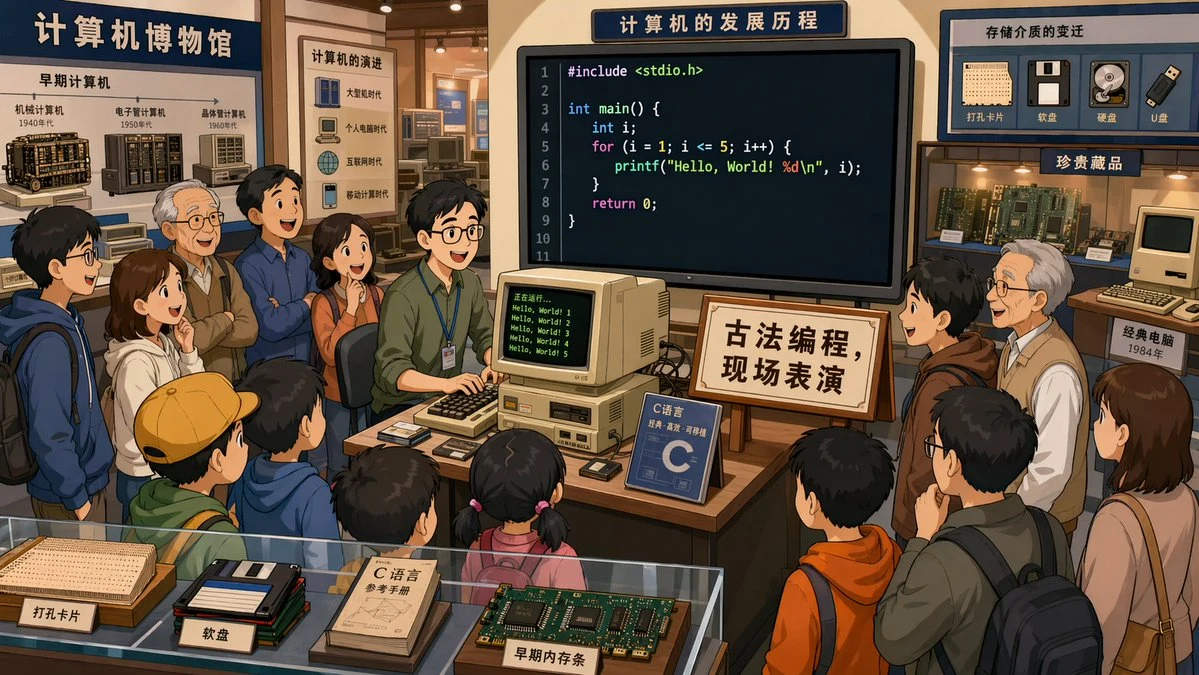
Retro Programming Museum Cartoon
people concept-art education

Retro Programming Museum Cartoon

In a computer museum, a programmer stands at the center of the exhibition hall demonstrating C language programming while many visitors watch. The screen displays clearly visible code. A sign next to them reads "Ancient Programming, Live Performance." 2D cartoon art style, 16:9 aspect ratio. The scene should be humorous and charming, with engaged spectators showing various reactions of amazement, confusion, and fascination.

Stephen Biesty Style Neural Network Diagram
concept-art diagram education

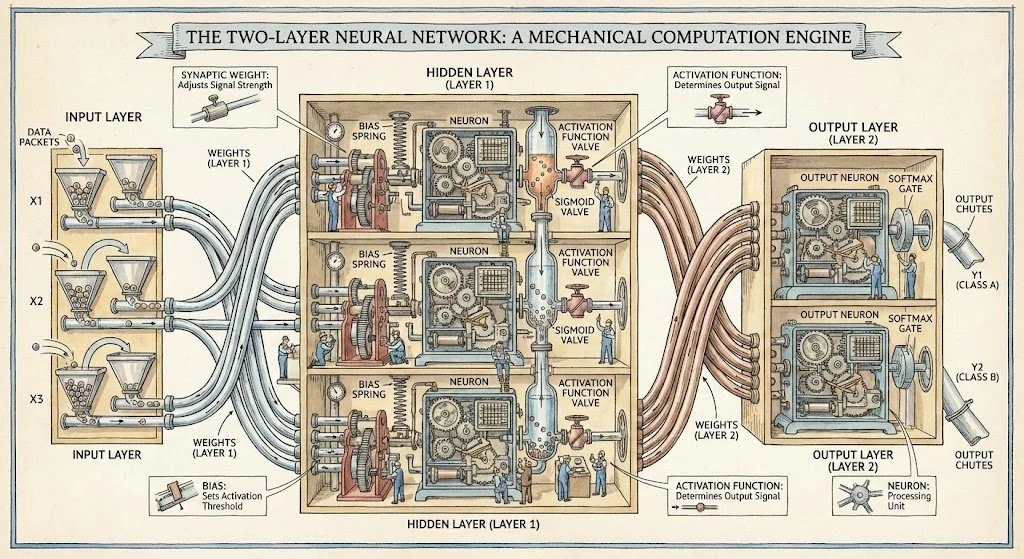
Stephen Biesty Style Neural Network Diagram

Generate a diagram of a two-layer neural network in the style of Stephen Biesty

How to Choose Infant Formula Guide
infographic education healthcare

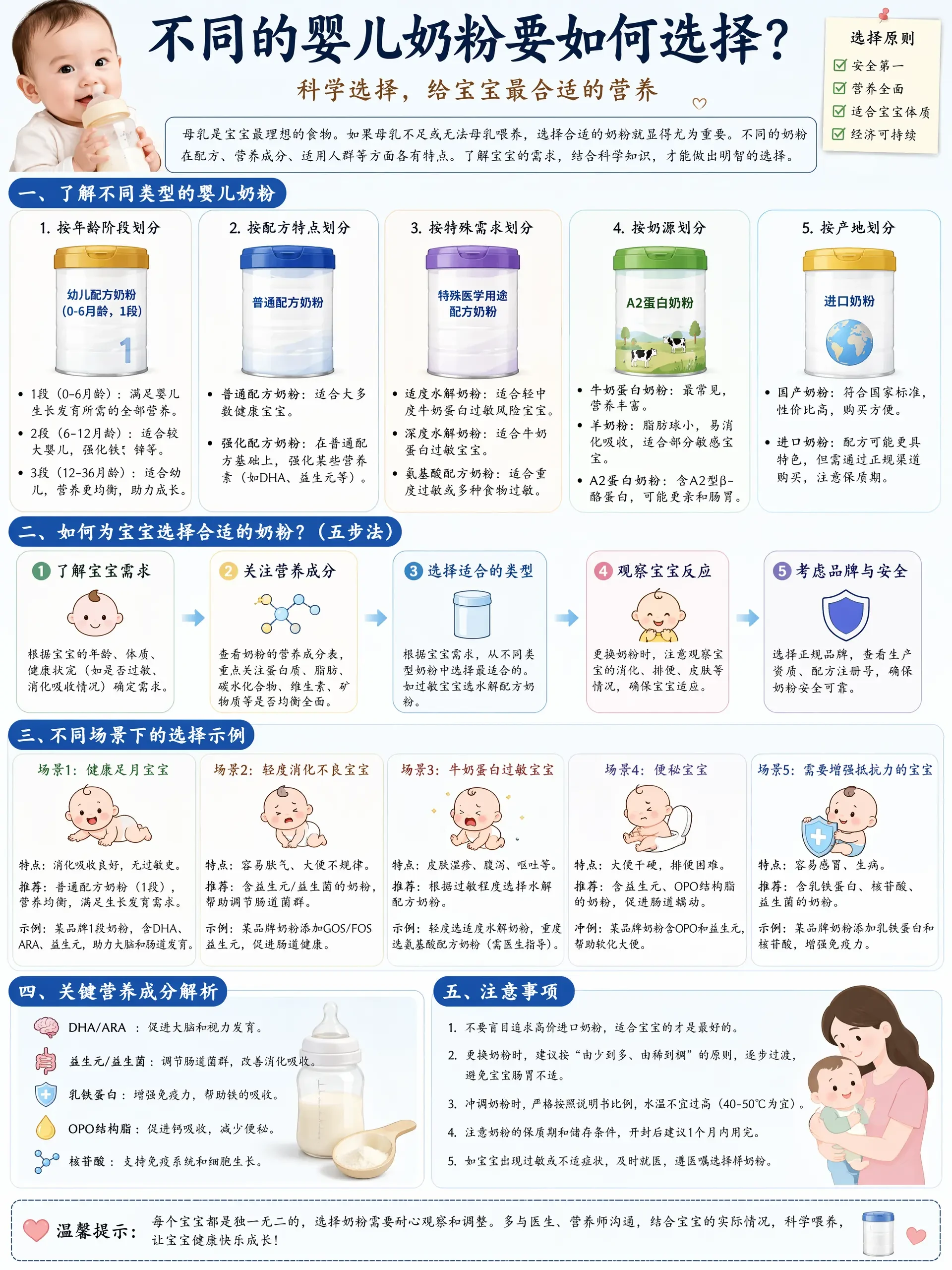
How to Choose Infant Formula Guide

不同的婴儿奶粉要如何选择?请提供图文并茂深入详细专业讲解,最好有各种场景的示例,中文用楷体

Japanese Shonen Manga Page Layout
anime character concept-art

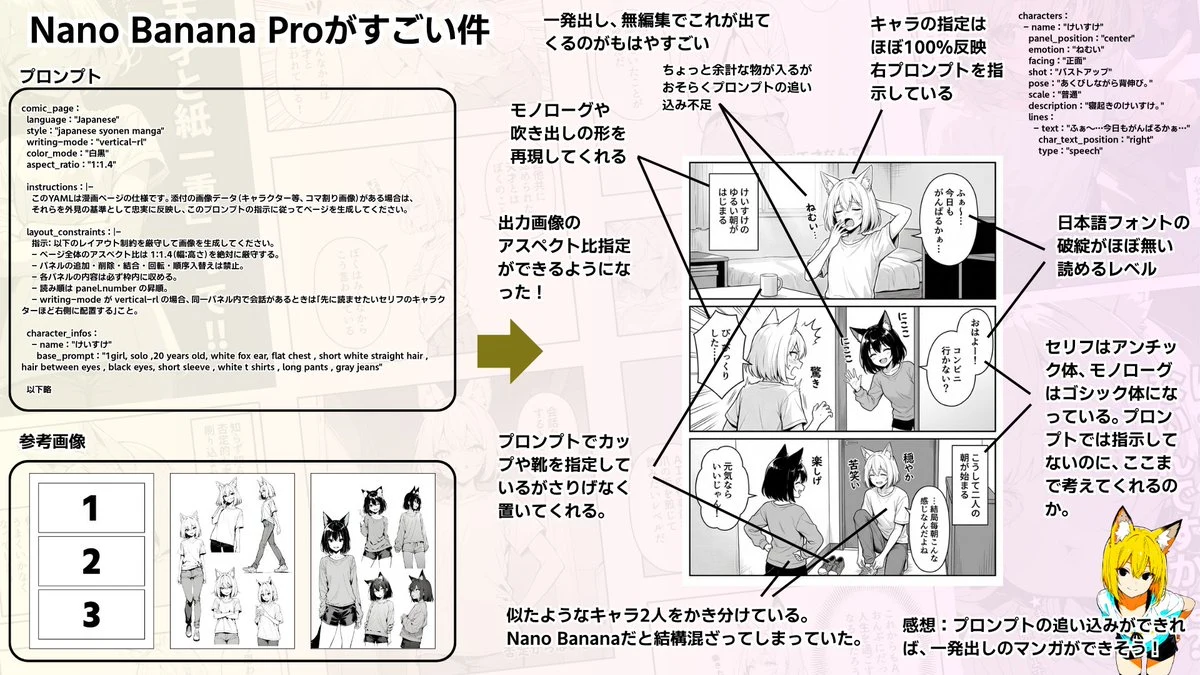
Japanese Shonen Manga Page Layout

comic_page : language : "Japanese" style : "japanese syonen manga" writing-mode : "vertical-rl" color_mode : "白黒" aspect_ratio : "1:1.4" instructions : |-

transformer llm architecture diagram
diagram infographic technology

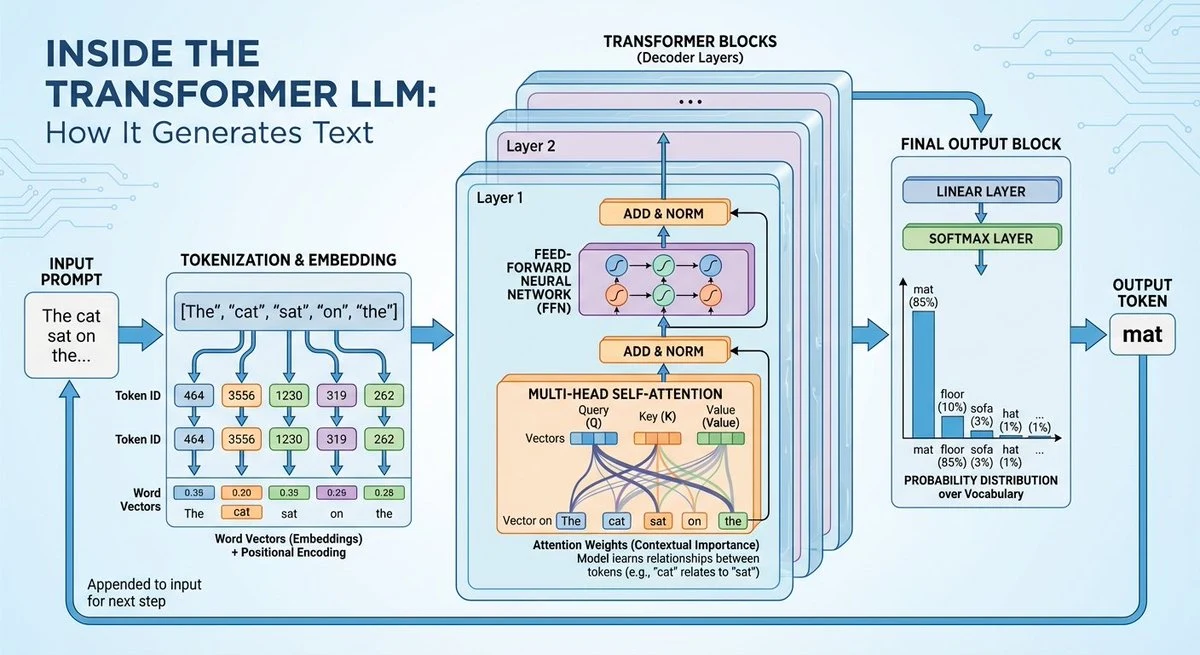
transformer llm architecture diagram

GENERATE A DIAGRAM OF SPACE SHUTTLE IN SPACE

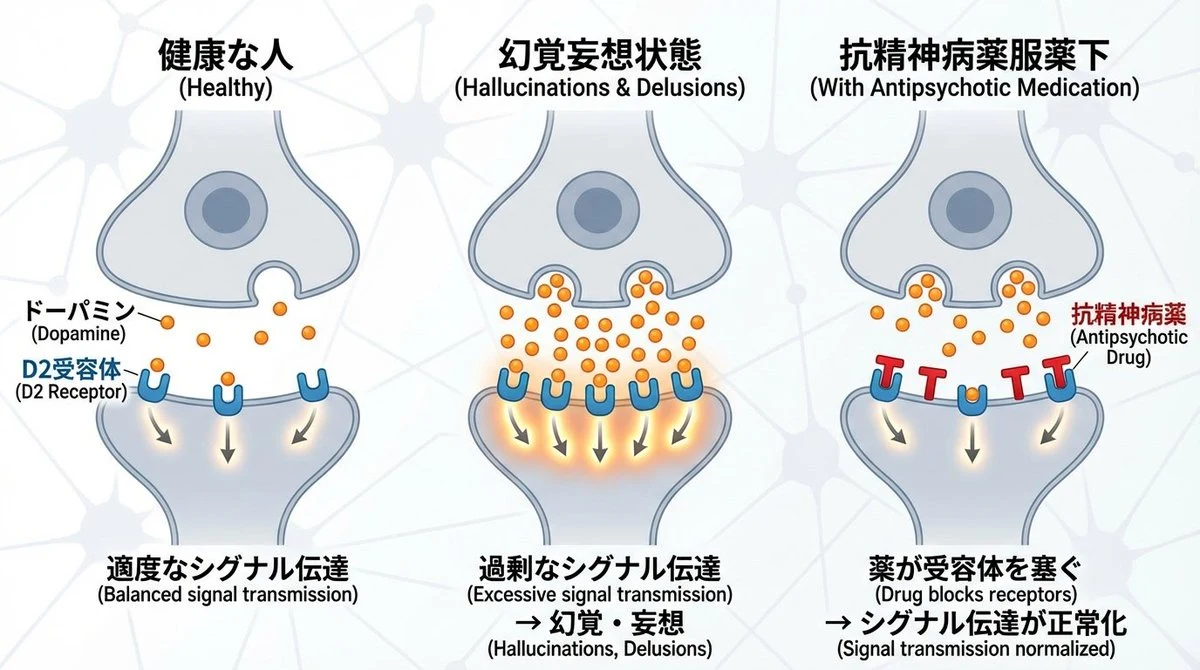
Dopamine Synapse Schizophrenia Diagram
diagram infographic education

Dopamine Synapse Schizophrenia Diagram

神経細胞同士のシナプス間隙のドーパミンおよびD2受容体の働きと、統合失調症の関係について図解したいです。抗精神病薬はD2受容体を塞ぐことで薬効を発揮します。これについて、 健康な人 | 幻覚妄想状態 | 抗精神病薬服薬下 の3つで図解してください。横長の画像を生成

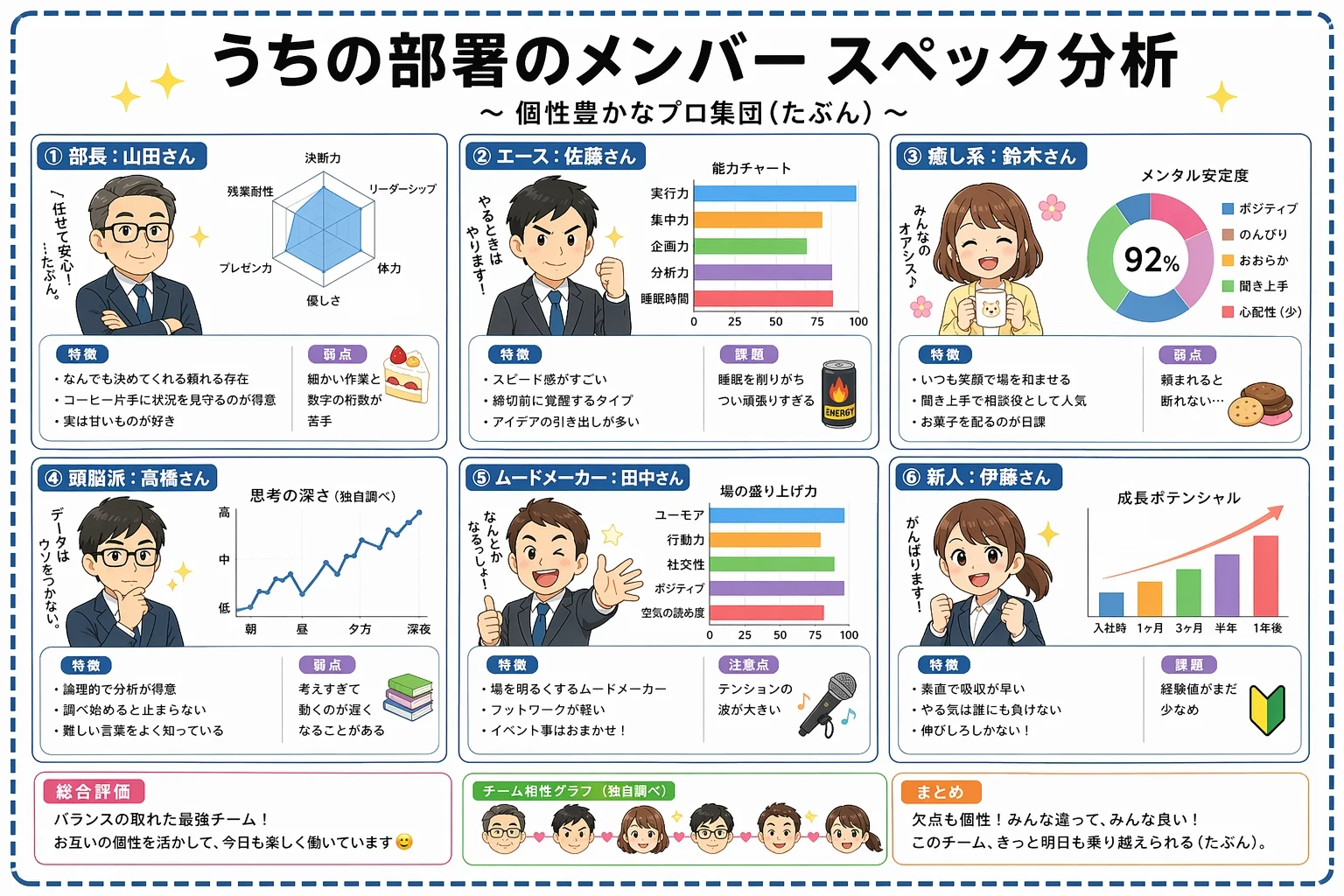
Japanese Team Member Analysis Infographic
infographic cartoon education

Japanese Team Member Analysis Infographic

Create a Japanese-language infographic titled "うちの部署のメンバー スペック分析" (Our Department Member Spec Analysis) with subtitle "個性豊かなプロ集団(たぶん)". Layout as a 2x3 grid of six member cards on a clean white background with pastel accents and star decorations. Each card features a cute chibi-style cartoon avatar and includes: member name and role in Japanese, a radar chart or bar chart showing their stats, bullet-point strengths and weaknesses in Japanese. Add a summary section at the bottom with overall team evaluation, a team compatibility graph placeholder, and a final takeaway note. Cheerful office illustration style, soft rounded UI elements, kawaii aesthetic, highly legible Japanese typography, no watermark.

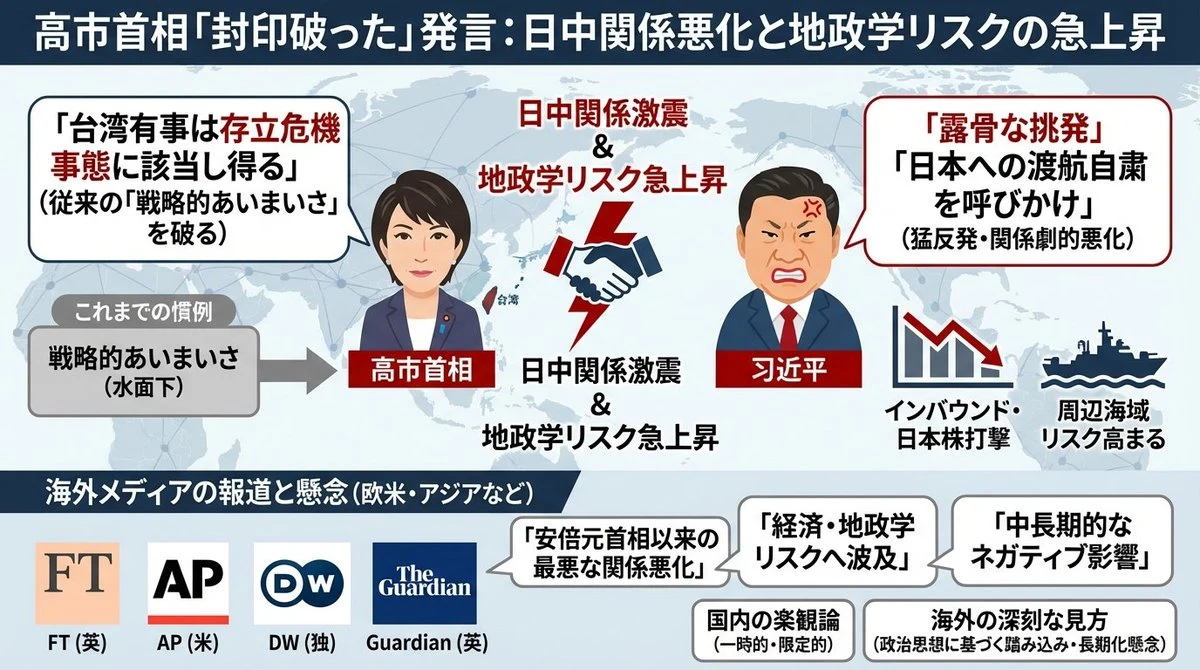
news article infographic slide
concept-art diagram infographic

news article infographic slide

以下の{argument name="記事媒体" default="Yahooニュース"}を1枚のスライドでわかりやすくイラスト含めて図示でまとめた画像を生成して。 ーーー {argument name="ニュース本文" default="{Yahooニュースのコピペ}"}

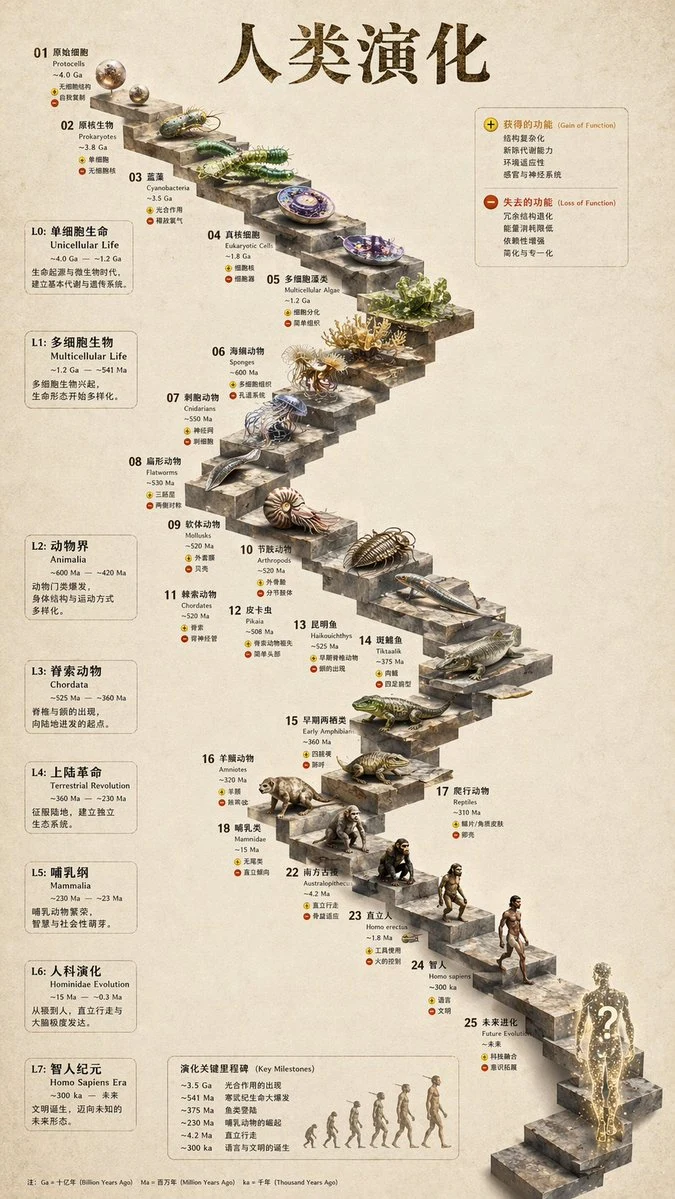
3D Human Evolution Timeline Infographic
photorealistic concept-art infographic

3D Human Evolution Timeline Infographic

{ "type": "evolutionary timeline infographic", "instruction": "Using REFERENCE_0 as a structural base, transform the flat vector design into a highly realistic 3D infographic. Replace the smooth ramps with distinct stone steps and upgrade all organisms to photorealistic 3D models.", "style": { "background": "{argument name=\"background style\" default=\"vintage textured parchment paper\"}", "staircase": "{argument name=\"staircase material\" default=\"realistic textured stone blocks\"}", "subjects": "{argument name=\"organism style\" default=\"highly detailed photorealistic 3D renders\"}" }, "layout": { "main_title": "{argument name=\"main title\" default=\"人类演化\"}", "sections": [ { "position": "left sidebar", "count": 8, "labels": ["L0: 单细胞生命", "L1: 多细胞生物", "L2: 动物界", "L3: 脊索动物", "L4: 上陆革命", "L5: 哺乳纲", "L6: 人科演化", "L7: 智人纪元"] }, { "position": "top right", "title": "获得的功能 / 失去的功能", "description": "Legend with plus and minus icons" }, { "position": "bottom center", "title": "演化关键里程碑", "count": 6, "description": "Timeline with a silhouette graphic of 6 figures showing ape-to-human evolution" } ], "centerpiece": { "description": "Winding stone staircase with 25 numbered steps featuring specific organisms.", "count": 25, "notable_elements": [ "Step 07: Jellyfish", "Step 09: Ammonite", "Step 10: Trilobite", "Step 24: Walking human", "Step 25: {argument name=\"future evolution concept\" default=\"glowing cosmic silhouette with a question mark\"}" ] } } }

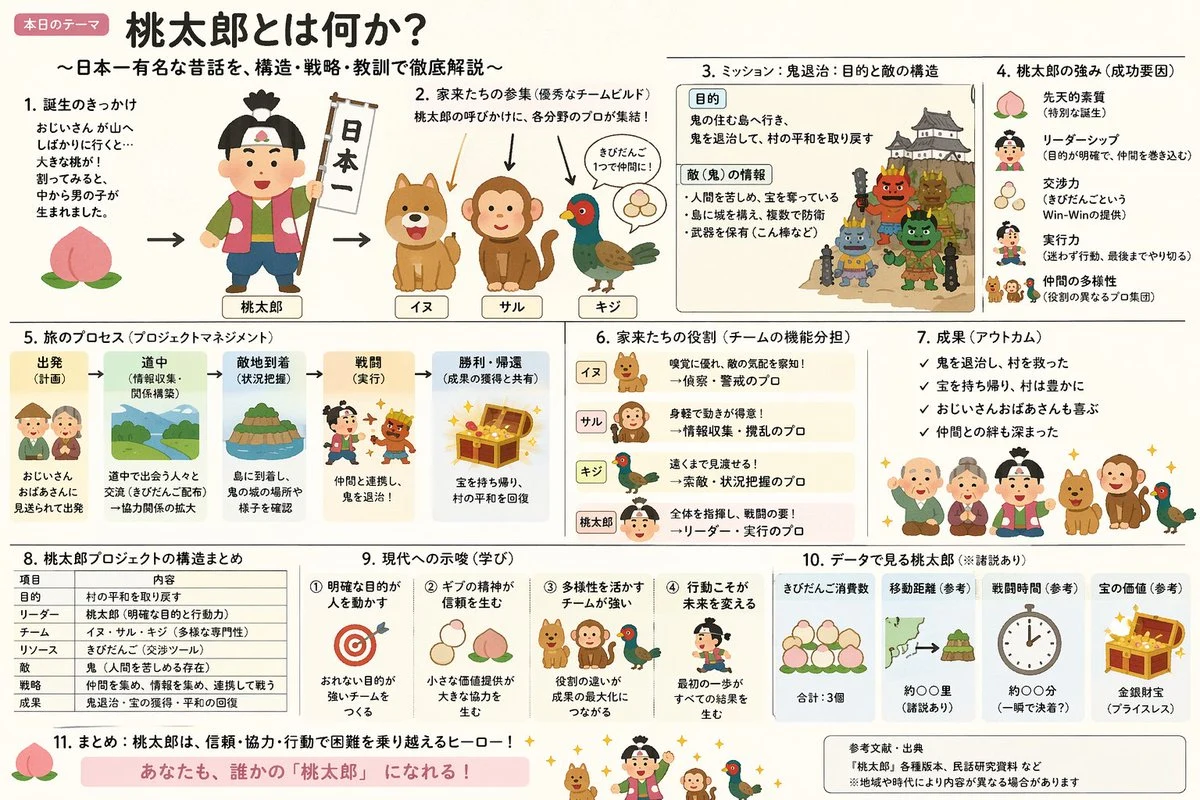
momotaro educational infographic slide
concept-art infographic cartoon

momotaro educational infographic slide

「いらすとや」のほのぼのとした雰囲気と、「霞ヶ関スライド」の圧倒的な情報密度を融合させた、{argument name="テーマ" default="桃太郎"}の解説スライド({argument name="形式" default="ポンチ絵"})を作成して

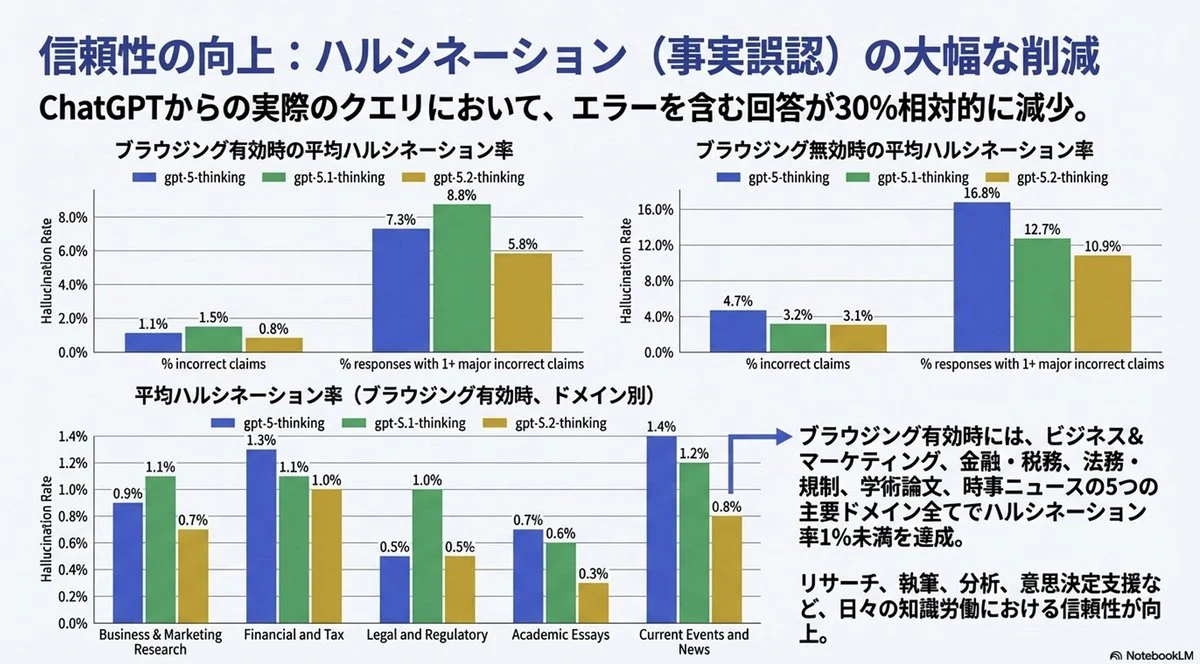
image-to-editable-powerpoint
diagram infographic technology

image-to-editable-powerpoint

添付の画像を、pptxの1枚のスライドで完全再現してください。 テキストは完全に編集可能な形にし、元の画像にある図やグラフは切り抜いて(クロップして)そのまま利用してください。